Networking
See:
This content is old! It’s still useful, but it’s old, and there may be bit rot, newer/better tools or ways to do things. Sanity check and do your research.
3CIPCalc IP Subnet mask calculator from 3Com.
ipsubcal.zip Simple IP Subnet mask calculator. Does not need to be installed, just unzip and run.
ipcalc.zip v1.02 Net3 Group’s IP Subnet mask calculator. Does not need to be installed, just unzip and run.
ipcalc2.zip v2.02 Net3 Group’s IP Subnet mask calculator. Must run a setup program.
Hymie’s IP Subnet mask calculator For the Palm Pilot.
This content is old! It’s still useful, but it’s old, and there may be bit rot, newer/better tools or ways to do things. Sanity check and do your research.
An IP (Internet Protocol) Address is a 32-bit number broken up into “quads” of 1 byte each, separated by dots. 1 byte is 8 bits which in decimal is a number in the range 0 to 255. For example, 10.234.56.71 is an IP Address. There are only so many “real” IP addresses, and they are (and have been) perpetually very close to being used up and thus are very difficult to get.
One of the solutions to this problem is so-called “private” IP Addresses. These are ranges of IP Addresses set aside expressly for use by a company or other entity internally. Private IP Addresses cannot be used to connect directly to the Internet–that is they are non-routable. These are also often called RFC1918 addresses.
You use a Private IP Address when you wish to use TCP/IP on your LAN, but do not wish to try and register enough legal or legitimate addresses for all your devices. Even if you do wish to get than many, you will not. Essentially all valid IP addresses are already owned, either by very large corporations (like AT&T) or by ISPs. When you contract for service from an ISP, you are allocated some number of legitimate IP Addresses out of that ISP’s pool of addresses.
See also my ../infosec/home and ../infosec/home_networks pages.
This is the “classic” RFC1918.
| Class | From | To | CIDR Mask | Decimal Mask |
|---|---|---|---|---|
| Class “A” or 24 Bit | 10.0.0.0 | 10.255.255.255 | /8 | 255.0.0.0 |
| Class “B” or 20 Bit | 172.16.0.0 | 172.31.255.255 | /12 (or more typically /16) | 255.240.0.0 (or 255.255.0.0) |
| Class “C” or 16 Bit | 192.168.0.0 | 192.168.255.255 | /16 (or more typically /24) | 255.255.0.0 (or 255.255.255.0) |
This table is a bit out of date and is downright WRONG in a few places (e.g., 24.0.0.0). Refer to IANA: Internet Protocol v4 Address Space, RFC3330 and the Bogon List for more up-to-date information.
The following was adapted (a long time ago) from this comment associated with RFC1918 and RFC3330. See also the Bogon List.
| Class/Type | From | To | CIDR Mask | Decimal Mask |
|---|---|---|---|---|
| Broadcast/This Net RFC1700 | 0.0.0.0 | |||
| 255.255.255.255 | N/A | N/A | N/A | |
| Null | 0.0.0.1 | 0.255.255.255 | /8 | 255.0.0.0 |
| Public-Data Networks RFC1700 | 14.0.0.0 | 14.255.255.255 | /8 | 255.0.0.0 |
| Cable Television Networks | 24.0.0.0 | 24.255.255.255 | /8 | 255.0.0.0 |
| Loopback RFC1700 | 127.0.0.0 | 127.255.255 | /8 | 255.0.0.0 |
| Local-Link (for auto-DHCP) | 169.254.0.0 | 169.254.255.255 | /16 | 255.255.0.0 |
| Testnet addresses (for tests only) | 192.0.2.0 | 192.0.2.255 | /24 | 255.255.255.0 |
| 6to4 Relay Anycast RFC3068 | 192.88.99.0 | 192.88.99.255 | /24 | 255.255.255.0 |
| Network Interconnect/Testing RFC2544 | 198.18.0.0 | 198.19.255.255 | /15 (supernet) | 255.254.0.0 |
| Class “D” (IPv4 multicast) RFC1700 | 224.0.0.0 | 239.255.255.255 | /4 (supernet) | 240.0.0.0 |
| Class “E” (don’t use) | 240.0.0.0 | 247.255.255 | /4 (supernet) | 240.0.0.0 |
NAT, AKA IP Masquerading, is the process by which a “private,” “illegal,” and non-routable IP Address is translated into a “legal,” routable address. There are two kinds of NAT, often called static NAT and Hide NAT. Static NAT provides a one to one correlation between the illegal private address and the legal routable one. For example, the Web Server on 192.168.1.10 may be statically mapped to 39.136.195.47. Hide NAT is a many to one arrangement where the many illegal addresses behind some device appear to the Internet as one single address (often the legal address of the device itself). For example, the entire 172.25.1.0 network may hide behind the single valid IP address of the device at 38.111.56.96.
There are three devices that typically perform NAT. They are routers, firewalls and proxy servers.
In hide mode, the external address of the NAT device “hides” most or all outgoing connections. To the Internet, it seems that all traffic originates from this single address, when it really comes from all different machines on the internal network. The traffic is differentiated at the NAT device by a table of port numbers. For example, the port used for Web Surfing is port 80 (http). If a client computer at 192.168.1.37 surfs to www.dell.com, the NAT device may assign that to port 20,134. When the response comes back, the firewall knows that anything directed to port 20,134 really goes to the client at 192.168.1.37. That way, more than one person can surf at the same time, using the same external IP address, but everything goes to the correct person.
In static mode, there is a one to one correlation between internal (illegal, non-routable) and external (legal, routable) addresses. The must be the case if you wish top have an E-Mail server, Web server or any other service that is accessible from the Internet. DNS (Domain Name Service) published the IP Addresses of server (or services) that are accessible. These published addresses must be legal, and routable. The IP network of addresses available for this use is termed the “moat” network, below. A typical “moat” network looks like this:
| IP Address | Description |
|---|---|
| 209.146.2.40 | Network Name |
| 209.146.2.41 | Available IP Address (usually assigned to the internal router interface) |
| 209.146.2.42 | Available IP Address (usually assigned to the external firewall interface) |
| 209.146.2.43 | Available IP Address (may be Web server?) |
| 209.146.2.44 | Available IP Address (may be E-Mail server?) |
| 209.146.2.45 | Available IP Address |
| 209.146.2.46 | Available IP Address |
| 209.146.2.47 | Broadcast Address |
A very interesting thing happens with static NAT, however. Since the router is at IP address 209.146.2.41, when it sees a packet destined for 209.146.2.43, it “arps” for the Web server. Since the router knows that it is on network 209.146.2.40/29 and the Web server address is 209.146.2.43 they should be on the same network. But they really aren’t. So when the router “arps” (uses the Address Resolution Protocol to find the Web server), the Web server will not answer, since it is really on network 192.168.1.0/24. To solve this problem, devices that perform static NAT also perform “proxy arp”.
Any device configured to do static NAT has a list of servers it will “answer for” when it hears an arp request. IT will essentially lie and say, “yes, I am that server, please send me the packet.” When it get the packet, it forwards it to the real server.
A very common small business-class (as opposed to home use) Internet connection looks like this following:
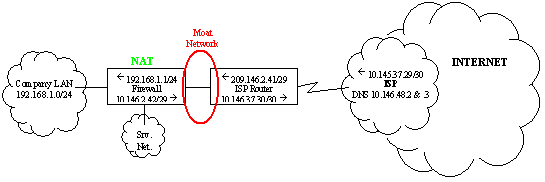
Figure 1: Common Firewalled Network Diagram–With Router
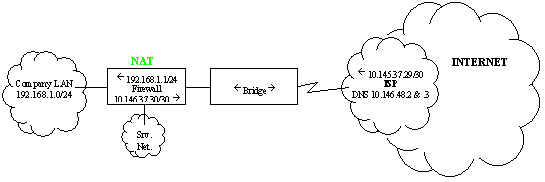
Figure 2: Common Firewalled Network Diagram–With Bridge
| Description | Network | IP Range |
|---|---|---|
| Company LAN | 192.168.1.0/24 | 192.168.1.1 to 192.168.1.254 |
| Service Network (DMZ) | 192.168.200.1/24 | 192.168.200.1 to 192.168.200.254 |
| Moat | 10.146.2.40/29 | 10.146.2.41 to 10.146.2.46 |
| Link Network | 10.146.37.28/30 | 10.146.37.29 to 10.146.37.30 |
| Network or Device | Default Gateway |
|---|---|
| Company LAN | 192.168.1.1 |
| Service Network (DMZ) | 192.200.1.1 |
| Firewall | 10.146.2.41 |
| ISP Router | 10.146.37.29 |
| Service | Internal Address | External Address | NAT Mode |
|---|---|---|---|
| Hide NAT | 192.168.1.0/24 | 209.146.2.42 | Hide |
| E-Mail Server | 192.168.1.15 | 209.146.2.44 | Static |
| Web Server | 192.168.1.10 | 209.146.2.43 | Static |
| CIDR | Decimal Mask | Old | A Subnets | B Subnets | C Subnets | # Useable | # Hosts |
|---|---|---|---|---|---|---|---|
| 8 | 255.0.0.0 | A | 1 | 16,777,214 | 16,777,216 | ||
| 9 | 255.128.0.0 | A | 2 | 8,388,606 | 8,388,608 | ||
| 10 | 255.192.0.0 | A | 4 | 4,194,302 | 4,194,304 | ||
| 11 | 255.224.0.0 | A | 8 | 2,097,150 | 2,097,152 | ||
| 12 | 255.240.0.0 | A | 16 | 1,048,574 | 1,048,576 | ||
| 13 | 255.248.0.0 | A | 32 | 524,286 | 524,288 | ||
| 14 | 255.252.0.0 | A | 64 | 262,142 | 262,144 | ||
| 15 | 255.254.0.0 | A | 128 | 131,070 | 131,072 | ||
| 16 | 255.255.0.0 | B | 256 | 1 | 65,534 | 65,536 | |
| 17 | 255.255.128.0 | B | 512 | 2 | 32,766 | 32,768 | |
| 18 | 255.255.192.0 | B | 1,024 | 4 | 16,382 | 16,384 | |
| 19 | 255.255.224.0 | B | 2,048 | 8 | 8,190 | 8,192 | |
| 20 | 255.255.240.0 | B | 4,096 | 16 | 4,094 | 4,096 | |
| 21 | 255.255.248.0 | B | 8,192 | 32 | 2,046 | 2,048 | |
| 22 | 255.255.252.0 | B | 16,384 | 64 | 1,022 | 1,024 | |
| 23 | 255.255.254.0 | B | 32,768 | 128 | 510 | 512 | |
| 24 | 255.255.255.0 | C | 65,536 | 256 | 1 | 254 | 256 |
| 25 | 255.255.255.128 | C | 131,072 | 512 | 2 | 126 | 128 |
| 26 | 255.255.255.192 | C | 262,144 | 1,024 | 4 | 62 | 64 |
| 27 | 255.255.255.224 | C | 524,288 | 2,048 | 8 | 30 | 32 |
| 28 | 255.255.255.240 | C | 1,048,576 | 4,096 | 16 | 14 | 16 |
| 29 | 255.255.255.248 | C | 2,097,152 | 8,192 | 32 | 6 | 8 |
| 30 | 255.255.255.252 | C | 4,194,304 | 16,384 | 64 | 2 | 4 |
| 31 | 255.255.255.254 | C | N/A | N/A | N/A | N/A | N/A |
| 32 | 255.255.255.255 | C | BC | BC | BC | Broadcast | Broadcast |
Notes:
URL: http://www.faqs.org/rfcs/rfc1918.html
Excerpt:
3. Private Address Space

   The Internet Assigned Numbers Authority (IANA) has reserved the
   following three blocks of the IP address space for private internets:

     10.0.0.0        -   10.255.255.255  (10/8 prefix)
     172.16.0.0      -   172.31.255.255  (172.16/12 prefix)
     192.168.0.0     -   192.168.255.255 (192.168/16 prefix)

   We will refer to the first block as "24-bit block", the second as
   "20-bit block", and to the third as "16-bit" block. Note that (in
   pre-CIDR notation) the first block is nothing but a single class A
   network number, while the second block is a set of 16 contiguous
   class B network numbers, and third block is a set of 256 contiguous
   class C network numbers.

   An enterprise that decides to use IP addresses out of the address
   space defined in this document can do so without any coordination
   with IANA or an Internet registry. The address space can thus be used
   by many enterprises. Addresses within this private address space will
   only be unique within the enterprise, or the set of enterprises which
   choose to cooperate over this space so they may communicate with each
   other in their own private internet.
This content is old! It’s still useful, but it’s old, and there may be bit rot, newer/better tools or ways to do things. Sanity check and do your research.
In 2007, the US and Canada, as well as others, changed the rules for when Daylight Saving Time begins and ends. In my opinion this is sheer idiocy, but then, they didn’t ask me. Anyway, it really screwed up quite a lot of things, many of which are not in our power to easily fix (GPS, car GPS, VCRs, embedded systems like cheap routers, and much more). Here are some resources:
If time is not consistent across your network
For more uses or requirements for time synchronization, search the RFCs for other RFCs that specify the use of NTP.
Fascinating book review and thread on NTP and time issues at Slashdot.
Why is UTC used as the acronym for Coordinated Universal Time instead of CUT? In 1970 the Coordinated Universal Time system was devised by an international advisory group of technical experts within the International Telecommunication Union (ITU). The ITU felt it was best to designate a single abbreviation for use in all languages in order to minimize confusion. Since unanimous agreement could not be achieved on using either the English word order, CUT, or the French word order, TUC, the acronym UTC was chosen as a compromise.
Which is correct, UTC or GMT? Does GMT have summer time? From http://wwp.greenwichmeantime.com/home.htm During the Summer the UK is on British Summer Time which is 1 hour ahead of GMT (GMT+1). […] GMT is fixed all year and does not switch to daylight savings time. […] Although GMT has been replaced by atomic time (UTC) it is still widely regarded as the correct time for every international time zone. Greenwich Mean Time is international time, the basis of the world time clock. Marks precision time and military time (sometimes called Zulu Time). […]
What some critical and significant dates in computing? See J R Stockton’s Critical and Significant Dates.
Hey, what time is it anyway? About comp.protocols.time.ntp: life imitates art.
Displays the time on or synchronizes your computer’s clock with the shared clock on a Microsoft Windows for Workgroups, Windows NT, Windows 95, or NetWare time server.
For example, if your PCD is named MYPDC, the following command in a shortcut in your Startup Group, or in a logon script will synchronize a client PC’s time at logon. Note, if your clients never log off, this will not work. Of course, that’s very bad for other reasons. This works for any system that runs Microsoft Networking. You can even sync again a Linux server running Samba with this command, if you’d like!
“net time \\MYPDC /set/ yes”
Win2K has a very simple SNTP facility built in: “net time /setsntp[:NTP server list]”. See the following for more information:
Here is the batch file I use, since I find the documentation lacking and the usage statement obscure:
You can see how it’s currently set by using this command: “net time /querysntp” which will return something like:
Note: usually, the REFERENCE server does not ever change it’s own time, it just serves the time. However, when using NTP, the REFERENCE server will adjust its local clock to synchronize with the NTP time source. See the middle of TID 10050215.
Thanks to Steve Schrank & Bob Kulp for some of these Netware pointers.
See the following articles as well. They are Sun centric, but still relevant for other UNIX systems:
Thanks to Greg Sottile for this section on IOS.
With that said, the commands are the following:
| IOS Commands | Description |
|---|---|
| clock timezone est -5 | Set your correct time zone. |
| clock summer-time edt recurring | Set daylight savings. |
| ntp master 6 | Become an NTP server. |
| ntp update-calendar | Periodically set calendar from an NTP server. Supported by 7000, 7200, 4500. |
| ntp server {insert your favorite NTP server here} | NTP server from which to get the time |
IPSO comes with xNTP, but you can’t change the default polling, which is something like every minute and a half. Until Voyager is enhanced to provide this capability, there is no easy way to do it. You could edit the ntp.conf file, but Voyager will overwrite it at bootup.
S50fixntp.sh is a script I got from Nokia support database resolution 3808 (Thanks Dameon), with minor modifications and additional documentation. Read the code for more details. Then read public NTP time servers for everyone and the NTP Pool for vendors.
| Port | Name | Description/Accuracy | Source |
|---|---|---|---|
| 13 tcp/udp | Daytime | Returns the day and time in an ASCII string. No accounting for different time zones, daylight savings, etc. Very inaccurate. | RFC867 |
| 37 tcp/udp | Timeserver | Returns the number of seconds since 00:00 (midnight) 1 January 1900 GMT, such that the time 1 is 2:00:01 am on 1 January 1900 GMT. No accounting for different time zones, daylight savings, etc. Very inaccurate. | RFC868 |
| 52 tcp/udp | Xns-time | Xerox Time | ( RFC1700) |
| 123 tcp/udp | NTP/SNTP | NTP (Network Time Protocol) or SNTP (Simple Network Time Protocol). Accurate to the limitations of the clock hardware. | RFC1305, RFC2030 |
| 309 | EntrusTime | ??? Entrust Time protocol ??? | GnatBox Admin Tool |
| 519 tcp/udp | unixtime | utime | ( RFC1700) |
| 525 tcp/udp | Timeserver | Timed | ( RFC1700) |
| 1506 | Utcd | UTC (Universal Time Coordinated, AKA GMT, AKA Zulu) daemon | GnatBox Admin Tool |
Notes:
This content is old! It’s still useful, but it’s old, and there may be bit rot, newer/better tools or ways to do things. Sanity check and do your research.
See Securing Windows NT/2000 Servers for the Internet by Stefan Norberg, page 153. ↩︎